Print layout syntax
Print layout example
<?xml
version="1.0"
encoding="utf-8"?>
<
Minimal print layout
<PrintLayout Name="Empty" Remark="NoPrint">
<PrinterResolution hDPI="300" vDPI="300">
<Canvas Height="0" Width="0"/>
</PrinterResolution>
</PrintLayout>
Tags
The XML configuration file is structured as follows:
| Element | Attribute | Cardinality Optional / mandatory | Description Valid values |
|---|---|---|---|
| <PrintLayout> | 1 | Root container element |
| Name | Mandatory, not empty | Name of the print layout |
| Remark | Optional | Comment on the print layout |
| <PrinterResolution> | 1 ... | |
| N | Container element for defining the printer resolution |
| hDPI | Mandatory, fixed value "300" | Horizontal resolution in DPI [dots per inch] Only the resolution 300 DPI is supported! |
| vDPI | Mandatory, fixed value "300" | Vertical resolution in DPI [dots per inch] Only the resolution 300 DPI is supported! | |
| <PrinterParameter> | Optional, 0..1 | Container Element for printer-specific parameters | |
| <Parameter> | Optional, 0..N | Element for printer-specific parameters |
| Name | Mandatory, name of the printer-specific parameter. |
| Value | Mandatory | Depending on the parameter name | |
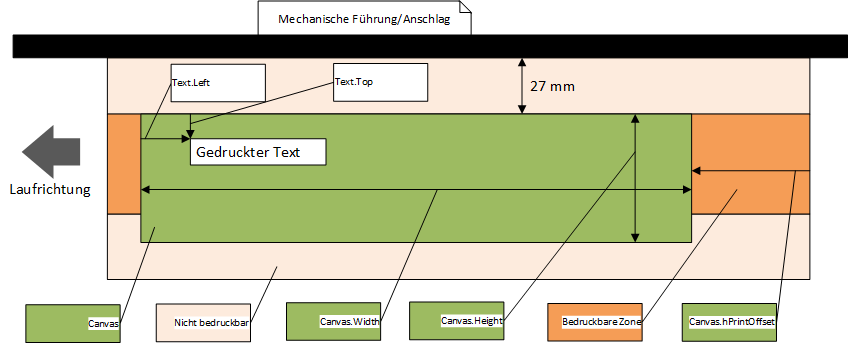
| <Canvas> | 1 | Element for virtual drawing area. |
| All position specifications of the <Image> and <Text> elements refer to the top left-hand corner of this drawing area. | ||
| hPrintOffset | Optional, type "Float" Default (if not defined) = "0.0" | Horizontal print offset in [mm] from the right-hand edge of the letter, see dimensioning. |
| If no automatic print offset is switched on or the automatic print offset does not find a free area, it is printed at the position defined here. | ||||
| Height | Mandatory, type "Float" | Height of the drawing area in [mm], see dimensioning | ||
| . Width | Mandatory, type "Float" | Width of the drawing area in [mm], see dimensioning. | ||
| <LoadFont> | 0 ... | N | Element for font. | |
| All fonts used by the <Text> elements must be loaded beforehand with <LoadFont>! | ||||
| FontNr | Mandatory | Internal number of the font, this is referenced by the <Text> elements. | ||
| File | Mandatory | File name of the font. | ||
| Font files must be in internal XiJet format (XFT). | ||||
| Rotation | Mandatory | Alignment/rotation of the font in angular degrees [º]. | ||
| Permitted values: "0", "90", "180", "270" | ||||
| <Image> | 0..N | Element for images, images must be saved in Windows BMP format! | ||
| File | Mandatory | File name of the image | ||
| hPos | Mandatory | Horizontal position in [mm] of the image in the drawing area relative to the top left corner of the canvas. | ||
| vPos | Mandatory | Vertical position in [mm] of the image in the drawing area relative to the top left corner of the canvas | ||
| . Height | Optional | Height of the image in [mm]. If defined, the image is printed up to a maximum of this height, the rest is cut off. | ||
| If not defined, the entire image is printed. | ||||
| Width | Optional | Width of the image in [mm]. If defined, thed image is printed up to a maximum of this width, the rest is cut off. | ||
| If not defined, the entire image is printed. | ||||
| <Text> | 0 ... | |||
| N | Element for static or dynamic text | The fonts used must |
| FontNr | Mandatory | Reference to font loaded via <LoadFont>. |
| String | Optional | Static text to be printed |
| Variable | Optional | Dynamic text to be printed. |
| The attribute defines the shipment attribute that is printed. See print variables for permitted values. Example: - "UPOC": UPOC of the shipment - "SIx": Sort info SIx of the shipment | |||
| Top | Mandatory | positioning/bounding box: Vertical position of the top left corner of the text field relative to the canvas [mm], see dimensioning. |
| Left | Mandatory | positioning/bounding box: |
| Horizontal position of the upper left corner of the text field relative to the canvas [mm], see dimensioning. |
| Bottom | Mandatory | positioning/BoundingBox: Vertical position of the lower right corner of the text field relative to the canvas [mm]. |
| Right | Mandatory | positioning/BoundingBox: |
| Horizontal position of the bottom right corner of the text field relative to the canvas [mm]. |
| Align | Optional | Optional attribute, if not defined, "Left" is used as the default. |
| Permitted values: "Left", "Center", "Right" |
| Reverse | Optional | 0= normal, 1= reverse colors |
| Wrap | Optional | Optional attribute, if not defined is used as default "0" (No Warp). Permitted values: "0", "1" 0 = No wrapping, , when text reaches the edge of the bounding box the text is cplipped 1 = Wrap text. |
| When text reaches the edge of the bounding box that word is automatically moved to the next line. |
| Mirror | Optional | Optional attribute |
| , if not defined is used as default | ||
| "0" (Not mirror | ||
| ) | ||
| . Allowed values: "0", "1" 0 = Not mirror 1 = Mirror the resulting image about the center of the horizontal bounds. |
| BottomJustify | Optional Optional attribute, if not defined is used as default "0" (No BottomJustify). |
| Permitted values: "0", "1" 0 = No BottomJustify 1 = Lines of text will be bottom justified ('Bottom' is a relative term, as it relates to rotation of 0). | ||
| BarcodeType | Optional | Defines whether the text is interpreted as a barcode. |
| Permitted values: "", "Interleaved2of5" | ||
| <CxReport> | Element for creating a label via CxReport | The CxReport identified via the Guid/Name attribute is executed and the label generated is printed as an image. |
| Guid | Optional, identification of the CxReport | used Guid of the CxReport used. Has priority, if empty/not available, the Name attribute is used for identification. |
| Name | Optional, identification of the CxReport used | Name of the CxReport used in the "CxLetterScan Label" report profile. Is only used if the Guid attribute is not available/empty. |
| hPos | Optional, default: 0 | Horizontal position in [mm] of the label relative to the top left corner of the canvas. |
| vPos | Optional, default: 0 | Vertical position in [mm] of the label relative to the top left corner of the canvas. |
The height of the printable area is fixed at 1.5 inches = 38 mm.
To make full use of the print area, 38 is therefore a sensible value for <Canvas>.Height.
180 degree rotated text
The following XML tags/attributes must be adjusted for printing 180 degree rotated text:
<LoadFont>.Rotation
The attribute <LoadFont>.Rotation must be set to 180!
<Text>.Bottom
The attribute Text.Bottomattribute instead
of Text.Top!
The height of the font used is taken into account internally by the printer.
This results in sensible values for Text.Bottom in the range from approx. 6 to 40, Text.Top can be set to 0.<Text>.Right
Use the Text.Right attribute instead of Text.Left!
The length of the text used is taken into account internally by the printer.
This results in sensible values for Text. Right in the range from approx. 100 to 200, Text.Left can be set to 0.
Example:
<?xml version="1.0" encoding="utf-8"?>
<PrinterResolution hDPI="300" vDPI="300">
<Canvas Height="38.1" Width="210">
<!-- 180 Grad Fonts -->
</Canvas>
</PrinterResolution>
Printing with CxReporting
The print can also be generated via CxReporting. A corresponding print layout must be defined for this, see example below.
The report generates a BMP file, which is then processed like an <Image> element.
The CxReports contained in a profile are loaded into the memory when the run is started; the report is executed for each consignment during the run.
The report is identified via the name or Guid of the report (Guid has priority). The name of the report is determined as follows:
Settings/General, tab "Configure reports", select checkbox "Show all reports", open profile "CxLetterScan Label", open report data via double-click, field "Report name" contains the name of the report.
Example:
<?xml version="1.0" encoding="utf-8"?>
Name="88314"/>
See also::
AdminDoc (#CxLetterScanPrint)
 |
CodX Software AG Sinserstrasse 47 6330 Cham Switzerland |
support http://support.codx.ch |
 |